
English | 中文
Agent Native HTML 编辑器 — 预览、标注、版本管理、补丁修改
人在渲染后的页面上指出问题,任意 Agent 把它变成一次受校验、可追溯的 DOM 修改。
功能亮点
- 可以直接画上去的实时预览 — 本地服务器、iframe 渲染、文件变更 WebSocket 热更新
- 两种选择模式 — Region(自由绘制,hit-test 命中笔迹下的全部节点)与 Element(hover 轮廓,点击选中)
- 能发现漂移的锚点 — CSS 选择器 + 文本 quote + 节点预览,绝不做模糊匹配
- 不可变版本树 —
v1 → v1.1 → v1.1.1,只分叉不合并,支持 diff 与检出 - 精准打补丁 — 5 种 DOM 操作;所有选择器先对冻结文档解析,同一次调用里的补丁不会互相移位
- 服务端强制的结构门禁 — 6 项确定性检查;不通过则不落版本,并返回 Agent 可自修的结构化报告
- 唯一选择器方言 — 前后端共用,只用
:nth-of-type;CI 用 11 个 fixture(含畸形 HTML)做双向一致性校验 - 实时活动流 — 任意传输面上的每一次工具调用,都出现在预览侧栏与 SSE 流里
- 三个 Agent 接入面 — MCP stdio、HTTP + SSE,以及每条命令都支持
--json的 CLI
架构
一个能力只声明一次,所有 Agent 接入面都是这份声明的薄投影。
 ┌── Agent,全部在本进程之外 ───────────────────────────────────────────────┐
 │  Claude Code · Cursor · Codex    OpenAI · AI SDK · LangChain   任意 shell │
 └──────┬─────────────────────────────────┬────────────────────────┬───────┘
        │ stdio JSON-RPC                  │ HTTP + SSE             │ argv
 ┌──────▼───────────┐         ┌───────────▼─────────┐   ┌──────────▼──────┐
 │ transport/mcp.ts │         │ transport/http.ts   │   │ transport/cli.ts│
 │  tools/list      │         │  GET  /v1/tools     │   │  --help --json  │
 └──────┬───────────┘         └───────────┬─────────┘   └──────────┬──────┘
        └──────────────────┬──────────────┴────────────────────────┘
                           ▼
      ┌────────────────────────────────────────────┐
      │ registry/  — 15 条能力,只声明一次           │──▶ scripts/update-docs.ts
      │   execute(): 校验 → handler → 事件          │    (生成参考文档)
      └──────┬──────────────────────────┬──────────┘
             ▼                          ▼
 ┌───────────────────────────────┐  ┌──────────────────────┐
 │ core/  — 不感知传输面          │  │ core/activity.ts     │
 │  preview · version · snapshot │  │  ActivityBus         │
 │  annotation · patch ─▶ gate   │  └────────┬─────────────┘
 │  verification · selector      │           │ WebSocket / SSE
 └───────────┬───────────────────┘           │
             │ .html-editor/                 ▼
             ▼                    ┌────────────────────────────┐
                                  │ ui/  Toolbar · Composer ·  │
                                  │ 侧栏:Annotations |         │
                                  │ Activity | Versions        │
                                  └───────────┬────────────────┘
                                              │ postMessage 桥
                       ┌──────────────────────▼─────────────────────┐
                       │ 预览 <iframe>                              │
                       │  <html> ├ [data-ah-ctl] 闭合 shadow root   │
                       │         │    control/ — 轮廓、ink、标记     │
                       │         └ <body>  人的 HTML,我们不碰        │
└────────────────────────────────────────────┘完整说明:Architecture。
截图
Element 模式 —— 点选任意元素,说明要改什么。

Activity —— Agent 正在做什么,不论它走的是哪个传输面。

Region 模式 —— 圈画一块区域,由命中测试挑出目标节点。

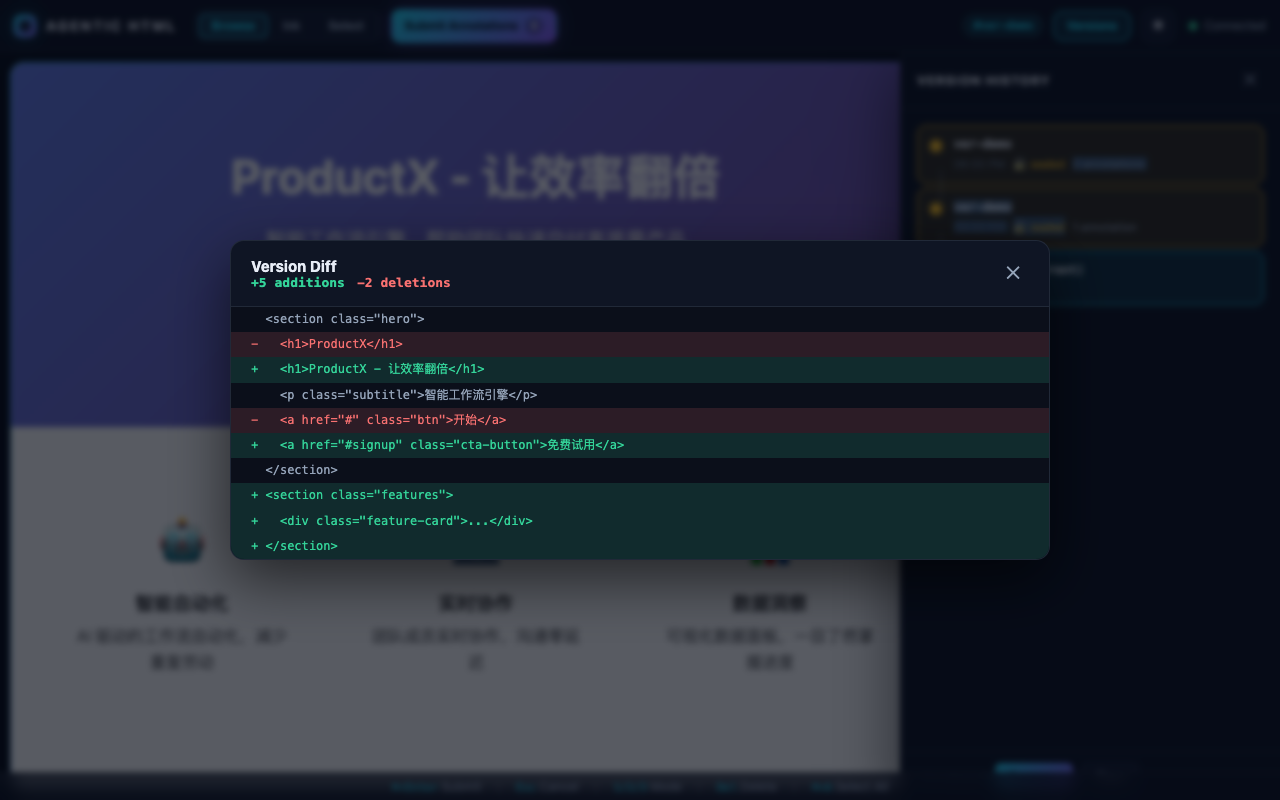
Versions —— 不可变、只分叉不合并的版本树。单击检出,Shift 选中两个可对比。

有什么不一样
四条性质,每条都能在本仓库里验证:
- 一致性来自构造,而不是自觉。 每个能力是
src/registry/commands.ts里的一条记录。 MCPtools/list、HTTP schema、CLI flag 和参考文档全是它的投影,npm run check:docs会在生成文档与注册表不一致时让 CI 失败。没有第二份实现可以漂移。 - 服务端校验 Agent 的产出。 Agent 在另一个进程里,不能靠它自证。6 项确定性检查在版本 产生之前运行;不通过则不落版本,并返回结构化报告(
src/core/gate.service.ts)。 - 补丁不会互相移位。 所有选择器先对冻结文档解析并缓存节点引用,再统一变更 (
src/core/patch.service.ts)。真正的冲突会被显式报告,绝不静默丢弃。 - 不论 Agent 走哪个传输面,人都能看到。 一条活动总线由唯一的
execute()路径喂养, 经 WebSocket 推给预览、经 SSE 推给 Agent(src/core/activity.ts)。
另外两条不那么显眼但很关键:
- 唯一选择器方言,前后端共用,只用
:nth-of-type,11 个 fixture(含畸形 HTML)做双向 一致性校验(tests/unit/core/selector.test.ts)。 - 交互层运行在预览文档内部,挂在
<body>之外的闭合 shadow root 上——这把跨 frame 坐标 补偿这一整类问题消灭掉了,而不是去实现它(src/control/,断言见tests/e2e/control-script.spec.ts)。
快速开始
安装
npm install -g @tengxiaohtx/agentic-html也可以不安装直接运行:
npx @tengxiaohtx/agentic-html doctor三种接入方式 —— 按你的 Agent 支持哪种来选
能力只在命令注册表里声明一次,MCP / HTTP / CLI 都是它的薄投影,因此三者不会互相漂移。 并且不论 Agent 走哪一种,人都能在同一个预览侧栏里看到它的动作。
1. MCP(Claude Code、Cursor、Codex,任意 MCP 客户端) —— 写入 .mcp.json:
{
  "mcpServers": {
    "agentic-html": {
      "command": "agentic-html",
      "args": ["mcp"]
    }
  }
}
工具 profile 用来控制上下文体积:默认 core,annotation,patch;需要全部工具用 ["mcp", "--tools", "all"],也可以组合如 core,version。
2. HTTP + SSE(OpenAI function calling、AI SDK、LangChain 或自研循环)
agentic-html serve --port 4173
curl localhost:4173/v1/tools/openai            # 可直接使用的 function specs
curl -X POST localhost:4173/v1/tools/preview_html \
     -H 'content-type: application/json' -d '{"file_path":"./index.html"}'
curl -N localhost:4173/v1/activity/stream      # 实时观察 Agent 在做什么
3. CLI(只有 shell 工具的 Agent)
agentic-html preview ./index.html --json
agentic-html annotations list <version_id> --json
agentic-html outline <version_id> --json
agentic-html patch apply --version-id <version_id> --patches "$(cat patches.json)" --json
与安装版本严格匹配的 Agent 指令
agentic-html skills get agentic-html --full指令由二进制直接提供,因此 Agent 读到的说明永远和它实际能调用的工具一致。
工具与命令参考
MCP 工具
| MCP 工具 | 用途 | Profile | 只读 | 必填参数 |
|---|---|---|---|---|
agentic_html_preview_html | Start a live preview | core | 否 | file_path |
agentic_html_close_preview | Close a preview session | core | 否 | session_id |
agentic_html_get_document_outline | Get the document structure | core | 是 | version_id |
agentic_html_get_region | Read one element and its context | core | 是 | version_id, selector |
agentic_html_get_dom_snapshot | Get a DOM snapshot | core | 是 | version_id |
agentic_html_get_activity | Read recent activity | core | 是 | — |
agentic_html_get_annotations | Get human annotations | annotation | 是 | version_id |
agentic_html_export_annotations | Export annotations | annotation | 是 | version_id |
agentic_html_resolve_annotation | Mark an annotation resolved | annotation | 否 | annotation_id |
agentic_html_apply_patch | Apply DOM patches | patch | 否 | version_id, patches |
agentic_html_preview_patch | Dry-run DOM patches | patch | 是 | version_id, patches |
agentic_html_get_version_history | Get the version tree | version | 是 | session_id |
agentic_html_create_version | Create a version from full HTML | version | 否 | parent_id, html_content |
agentic_html_checkout_version | Check out a version | version | 否 | version_id |
agentic_html_compare_versions | Diff two versions | version | 是 | version_a, version_b |
agentic-html mcp 默认公开 core,annotation,patch 三个 profile(11 个工具);--tools all 公开全部 15 个。HTTP 传输(agentic-html serve)默认公开全部工具,路径为 POST /v1/tools/<name>。
CLI 命令
| CLI 命令 | 用途 | 必填参数 |
|---|---|---|
agentic-html preview <file_path> | Start a live preview | file_path |
agentic-html preview close <session_id> | Close a preview session | session_id |
agentic-html outline <version_id> | Get the document structure | version_id |
agentic-html region <version_id> <selector> | Read one element and its context | version_id, selector |
agentic-html snapshot <version_id> [selector] | Get a DOM snapshot | version_id |
agentic-html activity | Read recent activity | — |
agentic-html annotations list <version_id> | Get human annotations | version_id |
agentic-html annotations export <version_id> | Export annotations | version_id |
agentic-html annotations resolve <annotation_id> | Mark an annotation resolved | annotation_id |
agentic-html patch apply | Apply DOM patches | version_id, patches |
agentic-html patch preview | Dry-run DOM patches | version_id, patches |
agentic-html versions list <session_id> | Get the version tree | session_id |
agentic-html versions create | Create a version from full HTML | parent_id, html_content |
agentic-html versions checkout <version_id> | Check out a version | version_id |
agentic-html versions diff <version_a> <version_b> | Diff two versions | version_a, version_b |
完整参数表见 docs/reference/commands.md。
配置
只有环境变量,没有配置文件。
| 变量 | 描述 | 默认值 |
|---|---|---|
HTML_EDITOR_PORT | 预览服务端口 | 0(自动分配空闲端口) |
HTML_EDITOR_WATCH | 文件变更时重载预览;0 / false 关闭 | true |
HTML_EDITOR_MAX_FILE_SIZE | 可预览文件的最大字节数 | 5242880(5MB) |
HTML_EDITOR_STORAGE_DIR | 版本与标注的写入目录 | .html-editor |
HTML_EDITOR_MAX_VERSIONS | 单会话最大版本数 | 200 |
AGENTIC_HTML_SKILLS_DIR | 覆盖随包 skill 的位置 | 从安装位置推导 |
单次调用的参数优先于环境变量:preview_html 直接接受 port 与 watch。
状态是纯 JSON 与 HTML,存放在存储目录下:
.html-editor/versions/
├── index.json
└── <version-id>/{snapshot.html, meta.json, annotations.json}读取版本、列出历史、打补丁都可以跨进程。compare_versions、checkout_version 与 create_version 的 parent_id 持有的是内存中的活引用,因此有状态的会话请放在同一个长驻 mcp 或 serve 进程里。
示例
每个传输面一个可运行示例:
examples/mcp-agent/—.mcp.json加一个跑 JSON-RPC 握手的verify.shexamples/http-agent/— 驱动 HTTP 传输面的agent.mjsexamples/cli-pipeline/— 使用--json的 shell 管道
另有 examples/simple-annotation/、 examples/version-history/、 examples/complex-dom-tree/ 作为 fixture 工作区。
开发
npm install
npm run dev:ui          # UI 开发服务器,端口 5273;加 ?demo=true 使用 mock 数据
npm run build           # clean + build:lib (tsc) + build:control (IIFE) + build:ui
npm test                # vitest:unit 与 fs 两个项目
npm run test:e2e        # Playwright
npm run check           # typecheck + test + check:version + check:docs
npm run update-docs     # 从注册表重新生成参考文档
完整开发指南见 docs/development.md;改动不得破坏的架构不变量见 SKILL.md。
贡献
- Fork 本仓库
- 创建功能分支 (
git checkout -b feature/amazing-feature) - 遵循开发指南
- 确保测试通过 (
npm test) - 提交更改
- 发起 Pull Request